Generate documents with Claude
Once Claude is connected to Formaliq, you can do the work from this guide's other walkthroughs by simply asking: "generate an engagement letter for this week's new client," or "send the intake form to dana@example.com." Claude works with your real templates, forms, and submissions, using only the access you grant it.
This guide connects Claude to Formaliq, then walks through the requests small firms use most.
What you'll build
A connection between Claude and your Formaliq account, and a chat where Claude generates documents from your templates and submissions:
Time needed: about 5 minutes to connect. After that, each request takes seconds.
Before you start
- A Formaliq organization on a paid plan, or in its free trial. Claude can't connect to an organization on the free plan.
- A Claude plan that supports custom connectors.
- At least one template in Formaliq, so Claude has something to generate from. See Automate your client engagement letter.
Step 1: Add Formaliq as a connector in Claude
In Claude, open Settings → Connectors and add a custom connector. Give it the name Formaliq and this URL:
https://api.formaliq.com/mcp
For Authentication, choose Sign in now, and for OAuth client, choose Register automatically. Then click Add, and Connect.
For every option, see Connect Claude.
Step 2: Choose what Claude can access, and allow it
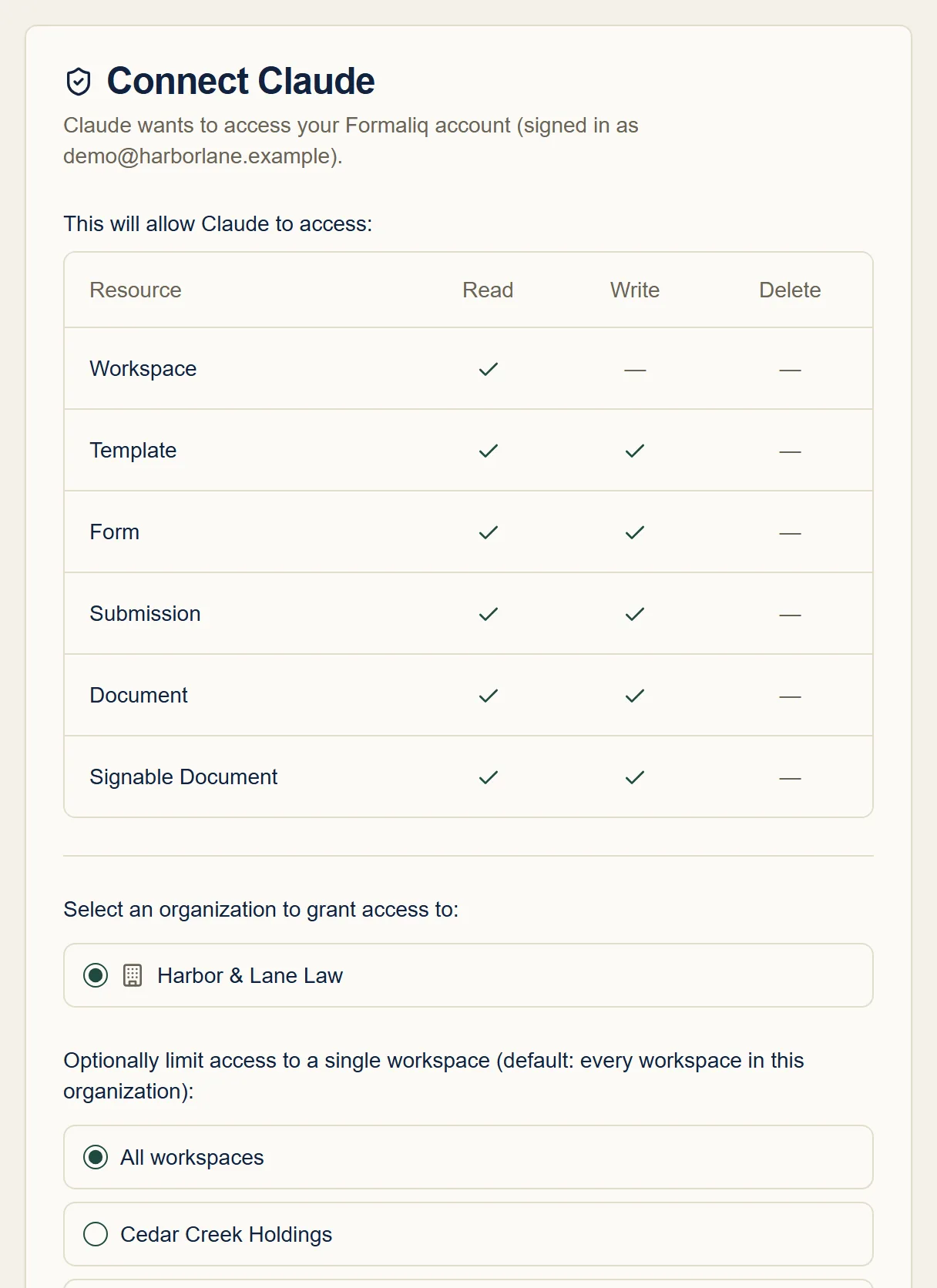
Claude opens Formaliq's Connect Claude screen. Sign in if you're asked to. The screen lists exactly what Claude is asking to read and change. Claude can't delete anything.
Choose the organization to connect. To keep Claude to one client or matter, choose that workspace under Optionally limit access to a single workspace; otherwise it can work in all of them. Then click Allow.
You're returned to Claude, and the connector shows as connected.
Step 3: Let Claude upload Word documents
To let Claude upload Word documents to Formaliq, such as a template you attach to the chat, open Settings → Capabilities in Claude and add this domain to the Domain allowlist:
api.formaliq.com
Step 4: Ask Claude to generate a document
Start a new chat and ask in plain English. Claude finds the right workspace, template, and submission, and tells you what it's about to do. For example:
Generate an engagement letter for Jordan Avery from their submission to the New Client Intake form, and give me the link.
Claude can also fill a template directly from details in the chat, with no form needed:
Use the Flat Fee Agreement template in Lakeside Estate Planning to create an agreement for Ana Ruiz, a revocable living trust, flat fee $2,400, dated today.
Every document Claude generates is saved in Formaliq like any other, on the workspace's Documents page.
Step 5: Let Claude handle the rest of the workflow
Claude can do more than generate. Requests firms use often:
| Ask Claude to... | Example |
|---|---|
| Turn a Word document into a template | "Here's our NDA (attached). Make it a template in Northwind Logistics, with placeholders for the client's company, address, and signer." |
| Send a form | "Send the New Business Client Intake form to dana.ortiz@example.com, with a note that it takes five minutes." |
| Check on responses | "Show me this week's submissions to the intake form." |
| Read a document back | "Summarize the fee terms in Ana Ruiz's flat fee agreement." |
| Send for signature | "Send Jordan Avery's engagement letter to jordan@example.com for signature." |
| Check signatures | "Which documents are still waiting on signatures?" |
Step 6: See and manage the connection in Formaliq
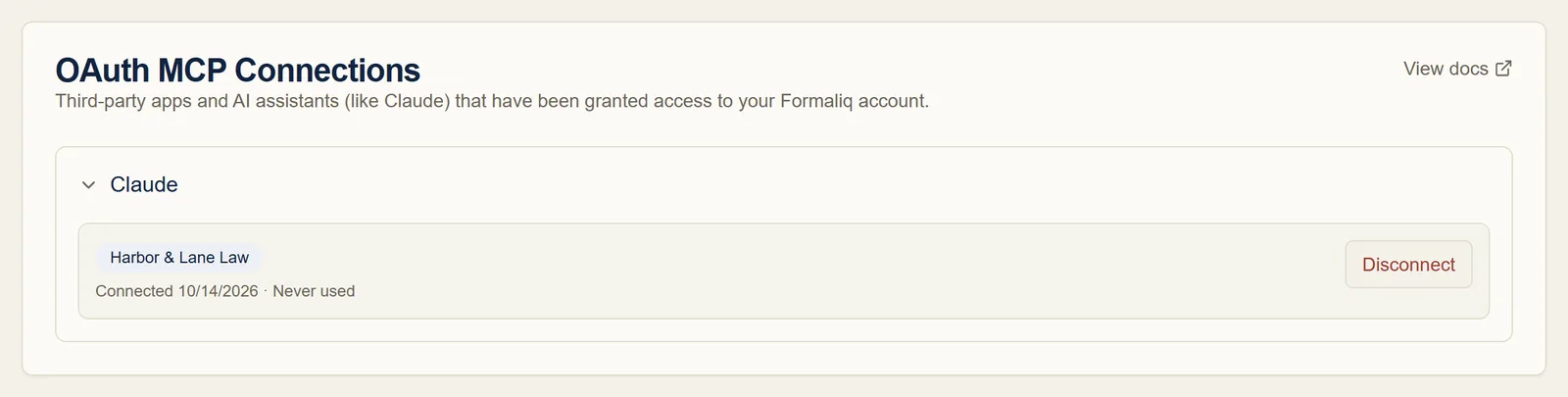
In Formaliq, go to Settings → Connections. Under OAuth MCP Connections, you can see which organization Claude can access, when it connected, and when it was last used. Click Disconnect to revoke its access at any time.
Troubleshooting and FAQ
Claude says it can't find my template or workspace
If you limited the connection to one workspace in Step 2, Claude can only see that workspace. Disconnect it in Formaliq, then connect again from Claude and choose All workspaces, or the workspace you need.
The connection asks me to upgrade
Claude can only connect to an organization on a paid plan or in its free trial. See Connections.
Claude can't upload my Word document
Add api.formaliq.com to Claude's Domain allowlist (Step 3), then
try again in a new chat.
Can Claude delete my templates or documents?
No. The connection grants read and write access only. Deleting is done in Formaliq.
Is this different from using ChatGPT?
The steps are similar. See Connect ChatGPT.
Next steps
- Connect Claude: the full connection reference.
- Generate documents from form submissions: the same work, done by hand in Formaliq.
- Send a document for e-signature: what your client sees when Claude sends a document for signature.